
Understand the Partner Dashboard
Understand the Partner Dashboard
The Dashboard provides a summary of activity across your partner account.
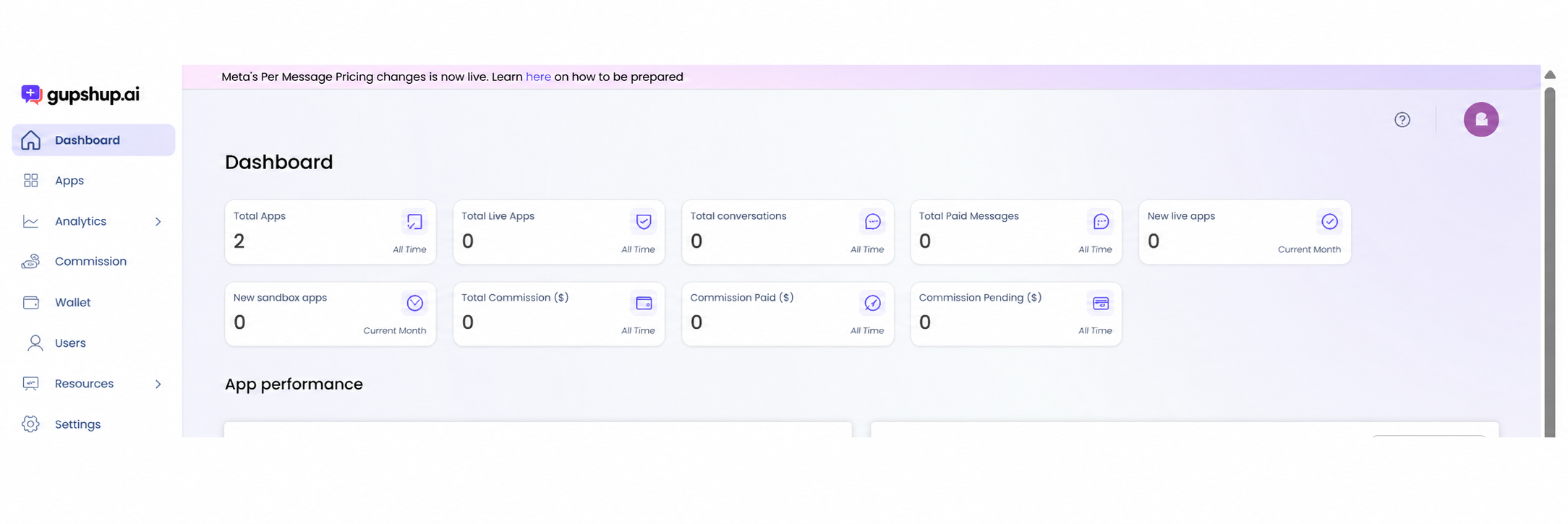
Open the Dashboard
- Sign in to the Bizgate Partner Portal.
- Select Dashboard in the left navigation.
Review the summary cards
The cards show:
- Total Apps: all apps linked to the account.
- Total Live Apps: apps that are live.
- Total conversations: conversations recorded for the displayed period.
- Total Paid Messages: paid messages recorded for the displayed period.
- New live apps: apps that became live during the current month.
- New sandbox apps: sandbox apps added during the current month.
- Total Commission ($): total commission for the account.
- Commission Paid ($): commission already paid.
- Commission Pending ($): commission awaiting payment.
Check the period label on each card. Some values are all-time totals, while others apply to the current month.
Review app performance
Scroll to App performance to review app-level information available to your account. Use the Analytics area when you need dedicated dashboards or reports.
Updated about 1 month ago
Did this page help you?