
Manage security and API client secrets
Manage security and API client secrets
Use the Security tab to review two-factor authentication and the status of your API client secret.
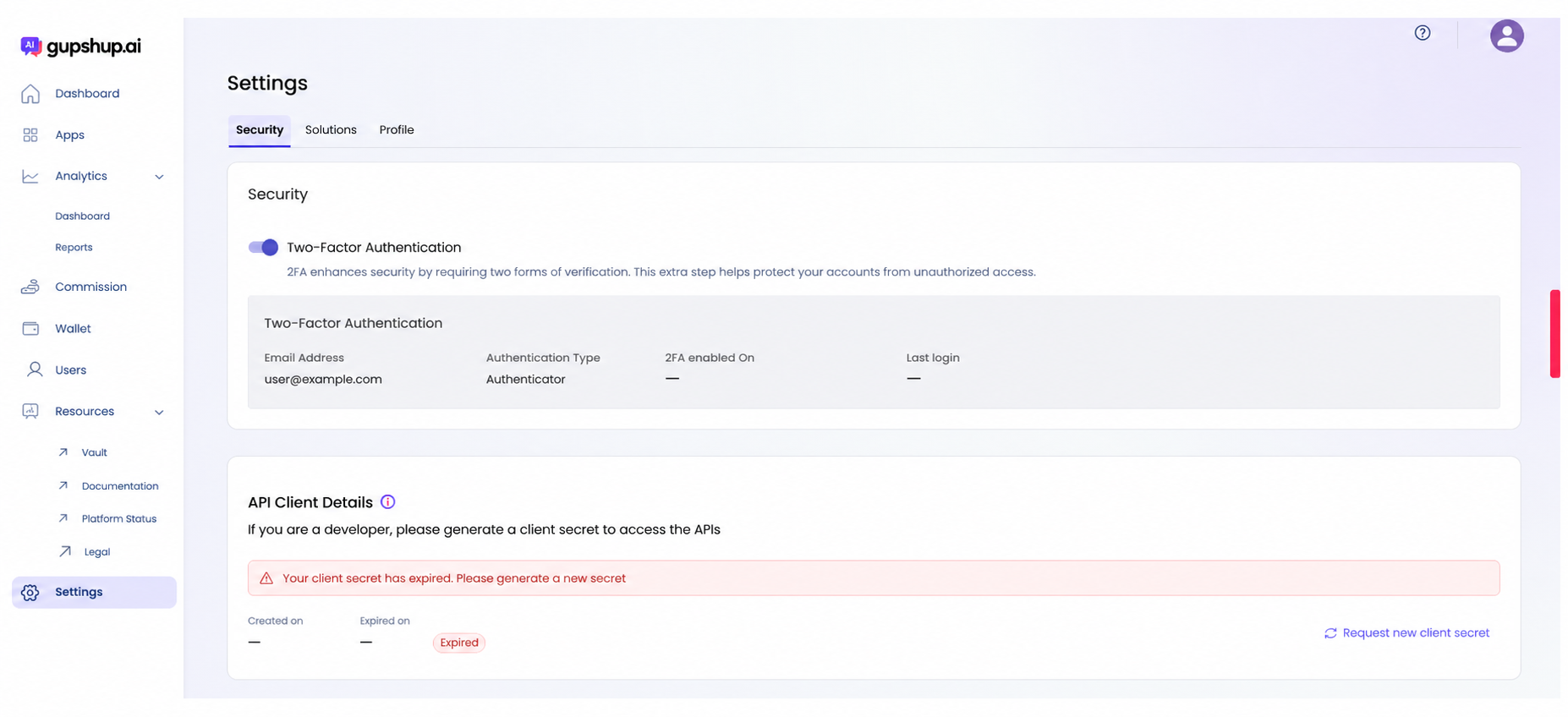
Open Security settings
- Select Settings in the left navigation.
- Select the Security tab.
Review two-factor authentication
The Two-Factor Authentication section shows:
- The email address associated with authentication.
- The authentication type.
- When two-factor authentication was enabled.
- The most recent login time.
Use two-factor authentication to add a second verification step and reduce the risk of unauthorized account access.
Review the API client secret
The API Client Details section shows when the current client secret was created and when it expires. If the secret is expired, the portal displays an expiration warning.
Request a new client secret
- In API Client Details, select Request new client secret.
- Copy the new secret and store it immediately in an approved secret-management system.
- Update integrations that use the previous secret.
- Verify the affected integrations before retiring the previous configuration.
A client secret is a credential. Do not include it in documentation, screenshots, chat messages, tickets, or source code.
Updated about 1 month ago
Did this page help you?